Challenge: Broken File
Category: Steganography
Scenario:
You’re a cybersecurity analyst working for a news agency. During a live broadcast, the video feed suddenly cut off, and the saved footage got corrupted. The IT team managed to recover a partial file (final.mp4), but it’s unplayable. Rumor has it that the corruption was intentional, and the footage contains critical information about an upcoming event. Your task is to repair the file and extract the hidden message or flag. Rumor also said that this hacker is capable of corrupting the file by just changing 1 byte of the file.
Step 1: Initial Analysis
-
Attempting to Open the File
When trying to open the video, an error occurred, indicating the file might be corrupted or in an unexpected format.
-
File Type Identification
Using thefilecommand, we determined that the file was recognized asdata, not a valid.mp4file:$ file final.mp4 forensic.mp4: data -
ExifTool Analysis
Runningexiftoolrevealed a file format error:$ exiftool final.mp4 Error: File format error
Step 2: Hex Analysis
- Inspecting the Hex Data
Using an online hex editor (hexed.it), we we found the file started with a fake flag and corrupted header:
00000000 63 74 66 7B 74 68 69 73 20 69 73 20 6E 6F 74 20 ctf{this is not
00000010 74 68 65 20 66 6C 61 67 7D 00 68 65 68 65 00 00 the flag}.hehe..
00000020 02 00 69 73 6F 6D 69 73 6F 32 61 76 63 31 6D 70 ..isomiso2avc1mp
Step 3: Repairing the File
- Fixing the
fytpatom- Remove
ctf{this is not the flag} . hehe .. - attach
ftypisomheader
- Remove
00000000 00 00 00 20 66 74 79 70 69 73 6F 6D 00 00 00 00 .. ftypisom...
00000010 69 73 6F 6D 69 73 6F 32 61 76 63 31 6D 70 34 31 isomiso2avclmp41 - Fix the
moovatom .
Clue : Rumor also said that this hacker is capable of corrupting the file by just changing 1 byte of the file.
- located uncompleted moov atom:
00003900 C2 DC 70 00 00 08 DE 6D 6F 76 00 00 00 6C 6D 76 .p....mov...lmv- Corrected it by adding ‘o’ byte
00003900 C2 DC 70 00 00 08 DE 6D 6F 6F 76 00 00 00 6C 6D .p....moov...lmv- Exporting the Repaired File
After saving the changes, the file was successfully recognized as a valid.mp4file.
Step 4: Analyzing the Repaired Video
-
Playing the Video
The video played but displayed only a blue background, suggesting further analysis was needed. -
ExifTool Re-examination
Runningexiftoolon the repaired file revealed additional metadata, including a hint:Comment: Maybe you haven't stare enough . The answer is here
Step 5: Frame-by-Frame Analysis
-
Extracting Frames
Usingffmpeg, we extracted all frames from the video:$ ffmpeg -i forensic_repaired.mp4 frame_%04d.png -
Inspecting Frames
Among the 30 extracted frames, Frame 2 contained the hidden flag at the top left conner:
flag: umcs{h1dd3n_1n_fr4m3}

Tools Used
file: Identified the file type.exiftool: Extracted metadata and identified errors.- Hex editor (hexed.it): Repaired the corrupted file header.
ffmpeg: Extracted video frames for analysis.
Flag
The hidden flag was found in Frame 11:
umcs{h1dd3n_1n_fr4m3}
Extra :
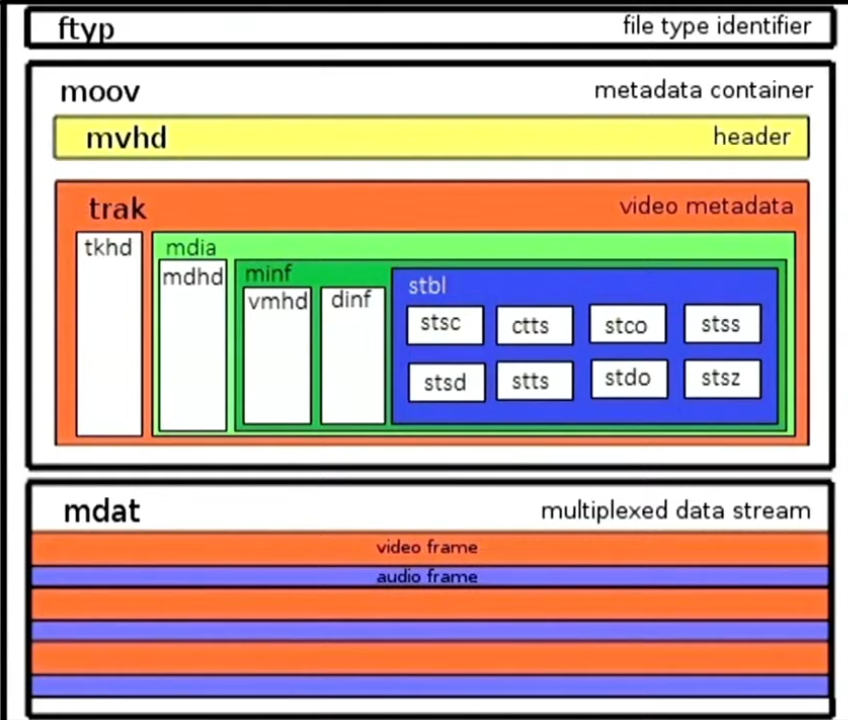 MP4 File Structure