Since we dealt with API . I opened my Postman . I try to change the GET to POST and others method but all method is not allow. Then maybe it has other API point?
so it get your input in fgets()
and make some cryptography to your input
as i dont understand the cryptography method lets ask our bestfriend about it Deepseek
We found that it used XOR with 5 as a key to encrypt Mpkq~d6130a00“761gdZfwdfnhx
So we put Mpkq~d6130a00761gdZfwdfnh`x as input and XOR with 5 as key in recipe in CyberChef and we got the flag
Flag : Hunt{a3465d55ee234ba_crackme}
Save Ali From Deadline
Category : Forensic
when we unzip the file and cd to the ctf-repo
i try ls
okay nothing
Let’s try ls -la
┌──(kali㉿kali)-[~/UMCyberHunt/Forensic/ctf-repo]
└─$ ls -la
total 12
drwxrwxr-x 3 kali kali 4096 Apr 21 06:00 .
drwxrwxr-x 3 kali kali 4096 Apr 21 06:00 ..
drwxrwxr-x 8 kali kali 4096 Apr  8 07:25 .git
we can see there is .git
so lets try see all log
$ git log --all --oneline --graph* d5e7027 (recover-branch) Add another file* 39eea18 (HEAD -> master) Add flag
Lets view both commit
$ git show 39eea18 # Check the initial commitgit show d5e7027 # Check the deleted commitcommit 39eea181779720bba6840a078299c5dd1b04ca7e (HEAD -> master)Author: Eunice Eng <euniceeng04@gmail.com>Date: Tue Apr 8 07:23:17 2025 -0400 Add flagdiff --git a/flag.txt b/flag.txtnew file mode 100644index 0000000..b9cfd5c--- /dev/null+++ b/flag.txt@@ -0,0 +1 @@+Hunt{G1t_1s_sup3rrrrr_Aw3s0me}commit d5e7027af0aaf2ec725ab84e561f37b7374eea7b (recover-branch)Author: Eunice Eng <euniceeng04@gmail.com>Date: Tue Apr 8 07:23:48 2025 -0400 Add another filediff --git a/anotherfile.txt b/anotherfile.txtnew file mode 100644index 0000000..f6e3ee4--- /dev/null+++ b/anotherfile.txt@@ -0,0 +1 @@+Random content
and we got the flag
Flag : Hunt{G1t_1s_sup3rrrrr_Aw3s0me}
Traffic Light
Category : Cryptography
the link direct us to youtube short video where there is a number with changing red and green background . My first thought is to exchange the color to binary
then we can just open CyberChef and add From Binary as recipe
and we got : HACKMYLIFE
Flag : HUNT{HACKMYLIFE}
Get The Flag
Category : Reverse Engineering
File Analysis
└─$ ./main
Reversing Challenge

Enjoy it !!!
Usage:Hunt{flag}
I analyze the file with redare2 but can only found 4 function and a lot of code that i dont understand .This was going for quite sometimes . Then my friends found out that the file has UPX
└─$ binwalk main

DECIMAL       HEXADECIMAL     DESCRIPTION
--------------------------------------------------------------------------------
0             0x0             ELF, 64-bit LSB shared object, AMD x86-64, version 1 (SYSV)
4061          0xFDD           Copyright string: "Copyright (C) 1996-2024 the UPX Team. All Rights Reserved. $
lets run
┌──(kali㉿kali)-[~/Downloads]
└─$ upx -d main
                       Ultimate Packer for eXecutables
                          Copyright (C) 1996 - 2024
UPX 4.2.2       Markus Oberhumer, Laszlo Molnar & John Reiser    Jan 3rd 2024

        File size         Ratio      Format      Name
   --------------------   ------   -----------   -----------
     23995 <-      8180   34.09%   linux/amd64   main

Unpacked 1 file.
Okay lets analyze with redare again. Alright this time we got a lot more familiar function and readeable code . After that i fire up my Cutter to look to inspect the main function
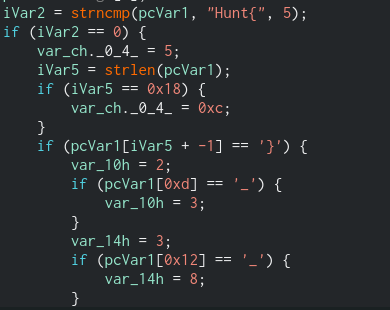
This function first compare the input whether = “Hunt{”
and then it check whether it has the length of 0x18(24 in decimal)
then it check the last input has } or not then at 0xd(13) there is _ and at (0x12) there is _ again
So the format is like this : Hunt{xxxxxxxx_xxxx_xxxx}
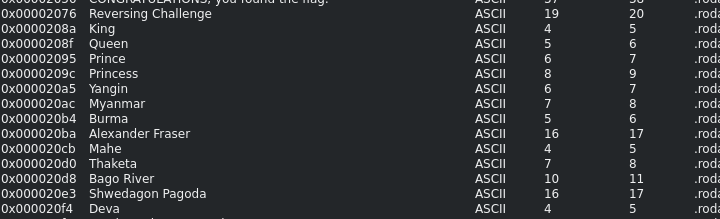
Alright Lets play around with Cutter more to find more information. In the strings section I found some word that might be the flag
Let try and error and submit the flag to the program. And we got the flag
└─$ ./main Hunt{Princess_Mahe_Deva}
Reversing Challenge

Enjoy it !!!
CONGRATULATIONS, you found the flag:  Hunt{Princess_Mahe_Deva}

Elapsed time in clock ticks: 60
All Done!
Flag : Hunt{Princess_Mahe_Deva}
Can you Reverse it ?
Category : Reverse Engineering
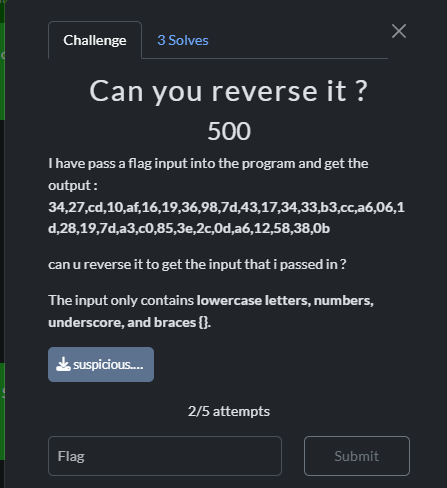
we were provided with text file which is weird for RE challenge so i try to view it and saw a lot of A so i try to remove it and make it executable .Unfortunately that didnt work . I notice there is == in the file so maybe it is base 64.
After play around with redare and Cutter i notice that this function only has 2 function which is main and iterate_int() . I try to understand it for quite sometimes . Since the Title of file is reverse . Then we need to reverse it i guess
Lets just copy the main and iterate_int() in the same file and prompt our AI to reverse it . After few hours trying it . the AI finally can do it an we got the flag
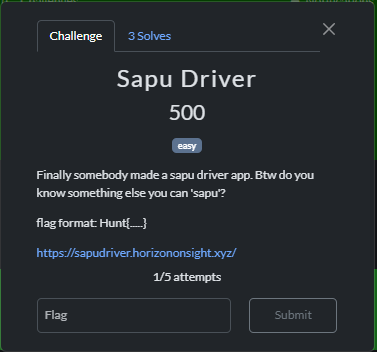 First i play around with the inspect tool . I found the script.js
 It got unauthorized access . Okay we are close . How to get access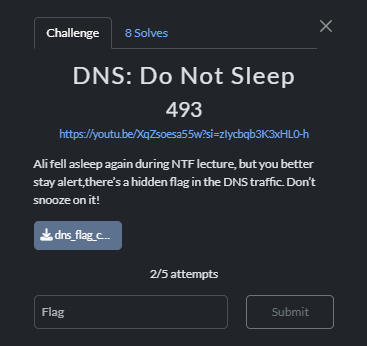
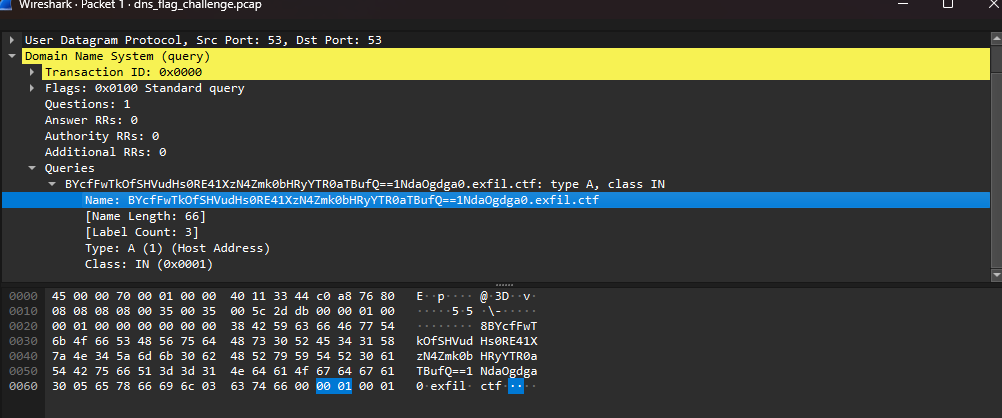 when we view the packet we can see there . Then copy the value and paste in my favorite decoder Cyberchef.io

 This function first compare the input whether = “Hunt{”
 Let try and error and submit the flag to the program. And we got the flag